

IMC Singer Campaign
Our generous “Choir Toms” have put up a challenge match and we would love for you to help meet it. On Sunday, March 16th, we are launching our I Love IMC Campaign 2025. Every dollar will be matched up to $10,000. That’s a total of $20,000 for the IMC!

Funds can be raised through our fundraising platform, or when someone makes a donation while buying tickets and uses your name to purchase tickets for Whatever, As If.
Below are instructions on how to:
How to set up your fundraising page
Go to: onecau.se/imc.
Click “Become a Fundraiser”.
Enter the requested information.
OneCause will text you a code. Enter the code.
Enter your first and last name.
Here you can upload a picture and type in a personal message. We recommend a starting goal of $250. Here is a sample message you can use: The Indianapolis Men’s Chorus has received a $10,000 match challenge and I need your help to unlock those funds and raise money for a cause near and dear to my heart. The IMC is like family to me. Even a small donation can make a big difference, especially because every donation is doubled! So, if you're up for it, please chip in whatever you can.
Click “create page”.
At the top of the page, you can edit your personal message, change your goal, get your short link to your page, and review your progress.
From this page, you can also make a personal donation to your fundraising page. If you are able, it’s a great way to get things rolling.
Set your goal
Setting a goal for your fundraiser is your first step. Research suggests that an initial goal of $250 is a good place to start. Once you've reached your goal, you can increase it and raise more funds.
Prizes
As you reach different milestones, you unlock prizes!
Just Sign Up and get a Choir Toms 2”X2” Temporary Tattoo.

Raise $25 (before the match) and get an IMC logo pair of sunglasses:

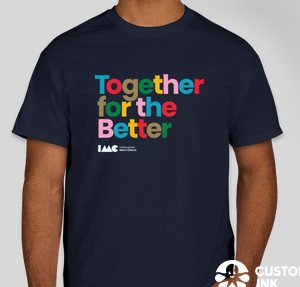
Raise $100 and get an IMC Together for the Better T-Shirt:
Raise $250 and get an IMC Camping Chair:

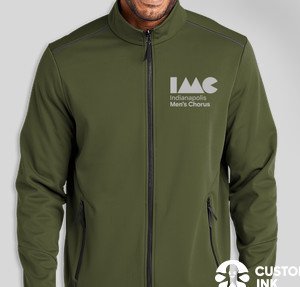
Raise $500 and get an IMC Jacket
Sharing
Sharing your fundraising campaign via your Facebook page, Twitter, Instagram, or LinkedIn, in addition to your own personal email list, is at the heart of every campaign. Leveraging these networks is how you'll meet—and hopefully exceed—your fundraising goals. You won't have the phone number of all of your network contacts, but choose a few that you know will respond well to a more intimate request: text messaging. Don't inflict the poison that is group texting on these people; take the time to send individual (copied and pasted) texts to each one.
TIP: Get personal and select a handful of your closest family and friends to reach out to as you announce your campaign. Close friends and family are more likely to donate, so getting them on board will let the rest of your network see that people are already supporting the cause.
When to share
There are four absolute times you should communicate with your network during a fundraising campaign (see sample emails and posts below):
1. Campaign launch
2. Midway goal
3. Final push
4. Campaign end or goal reached
We recommend maintaining momentum between each of these main milestone communications with one to two social posts per week and one weekly email to help keep your campaign top of mind. If you're texting, use those requests judiciously and make sure that you're not monopolizing the conversation with donation asks.
During the final push phase of your campaign, increasing your frequency to a few social posts a day has proven to be highly effective, so go for it!
We recommend creating a simple sharing schedule to plan out your communications ahead of time. This'll save you time and make your campaign more fun and less stress. You can use Google Calendar, Google Sheets, or even a notebook to plan out when you'll post to socials and email or text your network.
Graphics to use when sharing





Sample Emails and Social Posts
-
Email:
Hey there, [Name]!I've got some exciting news! The Indianapolis Men’s Chorus has received a $10,000 match challenge and and I need your help to unlock those funds. The IMC is like family to me, and I want to help.
Even a small donation can make a big difference, especially because every donation is doubled! So, if you're up for it, please visit my fundraising page at [URL] and chip in whatever you can.
If you haven’t purchased your tickets to Whatever, As If (April 18-19) at Warren Performing Arts Center) yet, you can use this code for a 20% discount -COWABUNGA - and leave a donation. That donation will also count towards my goal.
Can't donate right now? No worries! Just sharing this message with your friends and family can make a huge impact.
Thank you!
TWITTER:
Hey everyone! The @IndyMensChorus has received a match challenge and I want to help them reach it. Want to help out? Donate here and every dollar is matched up to $10,000: [shortlink] #SupportIMCFACEBOOK:
Hey friends! I'm helping @IndianapolisMensChorus to raise money for great cause. Can you lend a hand? Every dollar is matched up to $10,000! Donate now: [shortlink] #SupportIMCTEXT:
Hey [Name], just wanted to let you know I'm helping raise money for the Indy Men's Chorus. Can you chip in? Every dollar is matched up to $10,000! Here's the link: [shortlink] -
Email:
Hey [Name]!Guess what? We're halfway there! I've already raised half of my goal amount for the Indianapolis Men's Chorus. But I still need your help to reach the finish line!
If you haven't donated yet, now's the perfect time. Just visit [Campaign Site Link] and make a contribution. Every dollar is still being matched, so your donation will go twice as far!
Thanks a bunch for your support!
TWITTER:
We're halfway there! Just $XX more to reach my goal for @IndyMensChorus. Can you help me out? Every dollar is still being matched, so your donation will go twice as far! Donate here: [shortlink] #SupportIMCFACEBOOK:
We're halfway to our goal! Can you help us get all the way there? Every dollar is still being matched, so your donation will go twice as far! Donate now: [shortlink] #SupportIMCTEXT:
Hey [Name], just a quick update—I'm halfway to my fundraising goal for Indy Men's Chorus! Can you help me out by donating? Every dollar is still being matched, so your donation will go twice as far! Here's the link: [shortlink] -
Email:
Hi [Name]!
I'm so close to reaching my goal for the Indianapolis Men's Chorus! But I still need your help to get there.
I've raised [Amount Raised] so far, and I'm just [$XX] away from hitting my target. Can you pitch in one last time?
If you've already donated, thank you! But if not, there's still time. Just click this link [Campaign Site Link] and make a contribution.
And even if you can't donate, sharing this message with your friends and family would mean the world to me.
Thanks a million!
TWITTER:
Just one day left to help me reach my goal for @IndyMensChorus! Can you donate? [shortlink] #SupportIMCFACEBOOK:
Only one day left to donate! Can you help me reach my goal for Indy Men's Chorus? [shortlink] #SupportIMCTEXT:
Hey [Name], just wanted to remind you that there's only one day left to help me reach my fundraising goal for Indy Men's Chorus. Can you donate? Here's the link: [shortlink] -
Email:
Hey there, [Name]!We did it! Thanks to your amazing support, I've reached my fundraising goal for the Indianapolis Men's Chorus. I'm absolutely thrilled!
With your help, we've made a real difference, and it's all thanks to you. I can't thank you enough for your generosity.
Let's keep making the world a better place together!
TWITTER:
Thanks to everyone who helped me reach my fundraising goal for @IndyMensChorus! You're all amazing! [shortlink] #SupportIMCFACEBOOK:
We did it! Thanks to your support, I've reached my fundraising goal for Indy Men's Chorus. Let's keep spreading the love! [shortlink] #SupportIMCTEXT:
Hey [Name], just wanted to say a huge thank you for helping me reach my fundraising goal for Indy Men's Chorus. You're the best!
FAQ
As questions come in, we will update this FAQ.
How do I change my goal or update my personal fundraising page?
First, go to your personal fundraising page. At the top you will see an edit button. After clicking, you will be able to change your photo, your name, your personal message, or your goal.